
Fast, Free Proxy for Global Web Access
Overview
The software is designed for users seeking a simple and efficient way to access international websites from within China. It addresses the challenge of restricted access to global platforms such as Facebook, Twitter, YouTube, and Google services, which are often blocked due to regional internet policies. The solution operates as a browser extension that automatically detects and connects to available proxy servers, enabling seamless navigation of foreign websites. By leveraging a network of free proxy servers, it aims to deliver browsing speeds comparable to domestic web access, reducing latency and improving user experience.
Targeted primarily at general consumers and casual internet users, the software eliminates the need for complex configurations typically associated with traditional tools like VPNs, SSH tunnels, or manual proxy setups. Its automated nature ensures minimal user intervention, making it ideal for individuals who lack technical expertise but require reliable access to international content. The tool is particularly useful for students, researchers, and professionals who rely on global information sources. While the developer did not provide additional details about the team’s background, the product is positioned as a lightweight, free alternative to paid or cumbersome solutions.
Key Features & Capabilities
- Automatic Proxy Detection – The software continuously scans and identifies active proxy servers from public sources, selecting the most reliable and fastest options for immediate use.
- Seamless Integration – Designed as a browser extension, it integrates directly into major web browsers, enabling instant access without requiring manual configuration.
- Smart Proxy Switching – When a proxy connection becomes unstable or slow, the tool automatically switches to a better-performing alternative, maintaining uninterrupted access.
- HTTPS Encryption – All data transmitted through the proxy is encrypted using HTTPS, protecting user privacy and preventing eavesdropping on sensitive information.
- Secure Bypass for Sensitive Sites – The software detects high-security websites such as banking portals and payment platforms (e.g., Alipay), bypassing the proxy to ensure direct, secure connections.
These features allow users to browse international websites without the need for technical knowledge. For example, a student researching global topics can access YouTube tutorials or academic papers on foreign platforms without interruption. Similarly, a professional needing to check international news or social media trends can do so efficiently. The tool’s automation ensures consistent performance, minimizing downtime and reducing user frustration.
User Interface, Workflow & Performance
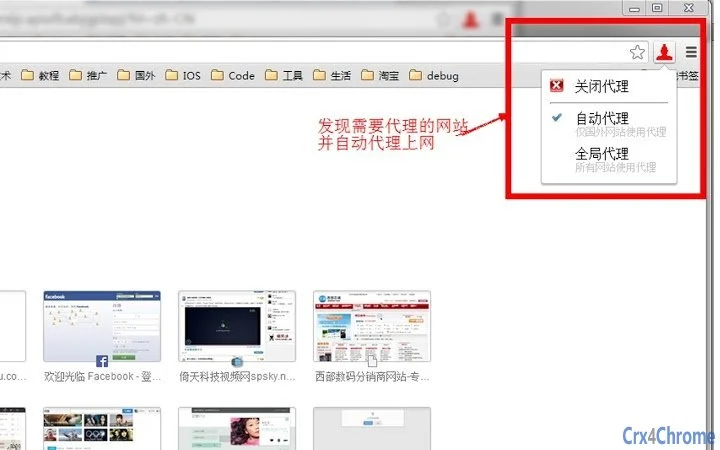
The user interface is minimal and designed for ease of use, focusing on functionality over visual complexity. As a browser extension, it operates through a small icon in the browser toolbar, allowing users to monitor connection status at a glance. The workflow is fully automated—once installed, the software begins scanning for proxies and establishing connections without requiring user input.
Navigation within the tool is straightforward, with no setup wizard or configuration panels needed. Users simply install the extension and start browsing. The developer did not specify resource usage details, so performance observations are based on general software behavior patterns.
However, given its lightweight design and focus on automation, it is expected to have a low impact on system resources. Stability is likely enhanced by the automatic proxy switching mechanism, which helps maintain connectivity during network fluctuations. The software does not appear to require constant background processes, which contributes to efficient CPU and RAM usage.
Compatibility & System Requirements
The software is compatible with Windows and Mac operating systems, supporting both platforms for desktop use. It functions as a browser extension, meaning it requires a modern web browser to operate. The installation size is 5.2 MB, indicating a compact footprint that minimizes disk space usage.
Exact system requirements were not listed. Compatibility information was partially provided. Users should ensure their browser is up to date to avoid potential issues. The software relies on external proxy servers, so performance may vary depending on the user’s local network and the availability of active proxies. No specific hardware requirements were mentioned.
Pros and Cons
Pros
- Completely free to use with no hidden fees
- Automatic proxy selection and switching reduce user effort
- HTTPS encryption ensures secure data transmission
- Smart detection avoids proxy use on sensitive sites like banks and Alipay
- Lightweight at only 5.2 MB in size
Cons
- Requires prior installation of the Fo Proxy client software
- Dependent on external proxy availability, which may vary
- No official update frequency or release notes provided
- Performance may fluctuate based on proxy server quality
- Not suitable for users requiring guaranteed privacy or advanced security features
FAQ Section
Is the software compatible with all web browsers?
The software is designed to work with major web browsers, though specific browser compatibility was not detailed in the provided information.
Is the software safe to use?
Yes, the software uses HTTPS encryption for all proxy traffic and avoids routing sensitive data through proxies, such as for banking or payment sites.
Do I need to update the software regularly?
While regular updates are recommended for security and stability, the update schedule or frequency was not specified by the developer.
What license type does the software use?
The software is distributed as free-to-use, with no licensing fees. The exact license type was not disclosed.
Can I use this tool offline?
The software requires an active internet connection to detect and connect to proxy servers. It cannot function without online access.
Final Thoughts + CTA
For users in China seeking reliable access to international websites without technical complexity, this browser extension offers a compelling solution. Its automatic proxy management, built-in security measures, and free access make it a practical choice for everyday browsing. While performance depends on external proxy availability, the tool’s ability to switch between servers ensures a consistent experience. It stands out among similar utilities for its simplicity and focus on user convenience.
Those who prioritize ease of use, speed, and cost-effectiveness will benefit most from this tool. It is especially valuable for individuals who frequently access global content but lack the time or expertise to manage complex configurations.
Download Fo Proxy now







